Friday, 27 November 2009
Safe mode

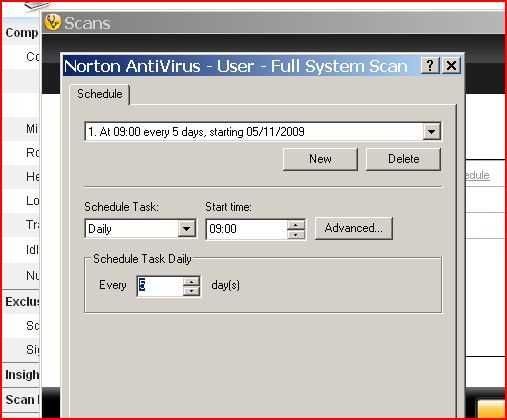
Scheduling set times for maintenance
Hardware maintenance


- Clean mouse (ball and rollers) checking for wear.
- Clean keyboard, checking for stuck keys.
- Clean monitor screen.
- Clean printer.
Tasks that should be carried out on a monthly basis are:
- Clean outside of case
Tasks carried out annually are:
- Check motherboard.
- Clean adapter cards.
The tasks that are listed above are all tasks that need to be carried out to keep the hardware clean and safe to use. If the hardware components are not cleaned when they need to be cleaned, this may cause things like dust collecting on the components and damaging them. To clean them, use cleaning equipment such as a soft lint-free brush. This can be used for cleaning glass and plastic surfaces on the components. Also using paper towels if any spillages occur, cotton buds for cleaning the mouse etc, a non-static brush for the more stubborn dirt and compressed air for cleaning fans, keyboards etc. When cleaning the hardware, you must take in consideration of the Health and Safety regulations. Making sure you use an anti-static wristbands and using anti-static mats. Other things you must take into consideration when cleaning the computer components is that the computer is switched of at the wall and that you are careful with sharp edges that may be on the components. Below is a picture of a CPU fan that hasn't been cleaned. This is wrong as the dirt and dust collects on the fan and eventually the fan will stop working and the computer will over-heat.
Compression utilities
Spyware removal
Software maintenance
(M3)The effect of all the activities is that it will improve your computers performance. This is because you are sorting through all the files etc on your computer, deleting files that are not being used, sorting the space and making it more effective to use. The effects of all this is that it will make your computer run more smoothly and quickly. This will benefit the user of the computer. Also the computer will/may have more space on the computer and the user of the computer can use this to store more files that are needed instead of having files that are not being used.
General maintenance
Daily things that should be done are:
- Virus scan of memory and hard disk.
- Take backup of changed data files.
Things that should be done on a weekly basis are:
- Clean mouse (ball and rollers) and check for wear.
- Clean keyboard, checking for stuck keys.
- Clean the monitor screen.
- Clean printer.
- Delete temporary files (Disk cleanup)
- Defragmenting hard disk and recover lost clusters. (Clusters are the unit of disk space allocated for files and directories).
Monthly tasks that should be carried out are:
- Cleaning outside of the case.
- Take complete backup of data files.
Annually tasks that need to be carried out are:
- Checking the motherboard.
- Clean adapter card contacts with contact cleaner and reset.
Other things that need to be done are:
- Record and back up CMOS setup configuration (CMOS is a type of memory that does not lose its data on a power loss).
- Keep a written record of hardware and software configuration.
Other things that you should watch for is dust settling on your computer components or dirt. This could prevent the components form working properly. For example, if there was dust that settled on the inside of the computer, it could mean that the cooling mechanism doesn't work properly, meaning that the components overheat and get damaged.